SCRUM IS A GAME

You don't need a NASA control panel
to run a Sprint.

4 languages. Real-time sync. Nothing you don't need.

100%
Scrum-Focused
Real-time
Sync
Intuitive
Operation
4 Languages
Supported
Multi-Project
Support
Lasimban Dashboard Screen

Do you have these challenges?

Common concerns many teams face in Scrum development

🤯

Tools are too complex

Enterprise tools pack hundreds of features your team will never touch. Simple Scrum shouldn't require a NASA control panel.

🌏

Distributed teams lose sync

When your team spans multiple cities and languages, information gaps widen. Real-time visibility becomes critical, not optional.

📊

Poor progress visibility

Sprint progress isn't clear at a glance. Teams can't feel achievement without proper visualization.

Lasimban solves these challenges

Lasimban's 6 Features

Six values that lead Scrum development to success

Epic / PBI / Sprint Management Screen
Feature 01

Scrum-focused
Design

Standard hierarchy management for Epic, PBI, Sprint, and Task. Priority management and advanced filtering features allow all team members to use it without confusion.

Naturally manage hierarchical structure from Epic to Task

5-level priority system (Highest to Lowest)

Advanced filtering (URL shareable)

Multilingual Settings Screen or Multilingual UI Capture
Feature 02

Multilingual Teams
Use Their Own Language

Native 4-language support. Every team member practices Scrum in their own language

Full 4-language support (Japanese, English, Tagalog, Vietnamese)

No translation needed — everyone practices Scrum in their language

Zero misalignment with real-time synchronization

Global support with timezone settings

One team rhythm, regardless of language

Real-time Sync Demo Screen
Feature 03

Real-time Collaboration
Zero Misalignment

Automatic synchronization via WebSocket reflects changes immediately to all members. No page refresh needed, all team members always share the same information.

Task updates are immediately reflected on everyone's screen

Real-time awareness of who is editing what

Prevent conflicts and enable smooth collaboration

Feature 04

Visualize Progress
Share Achievement

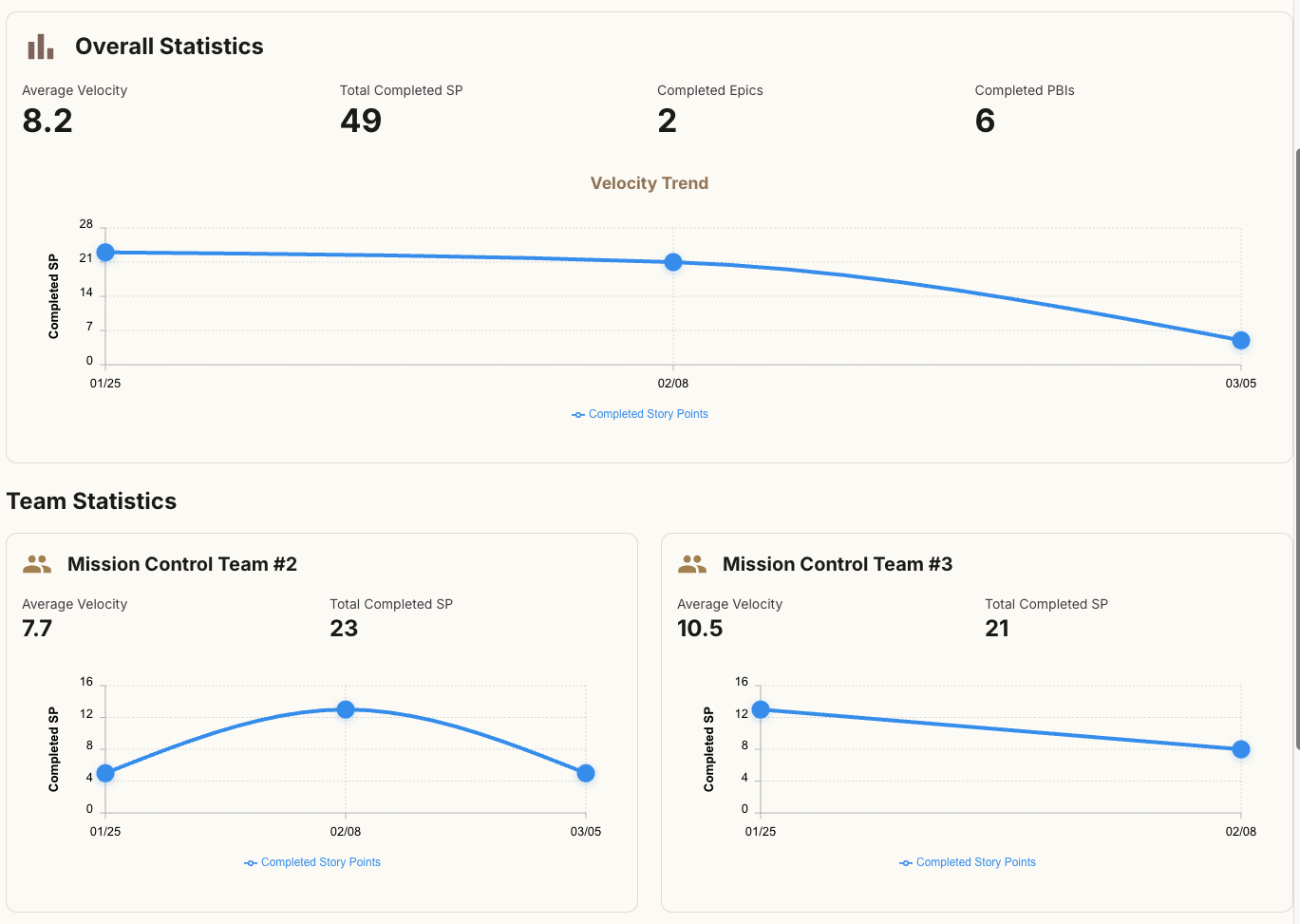
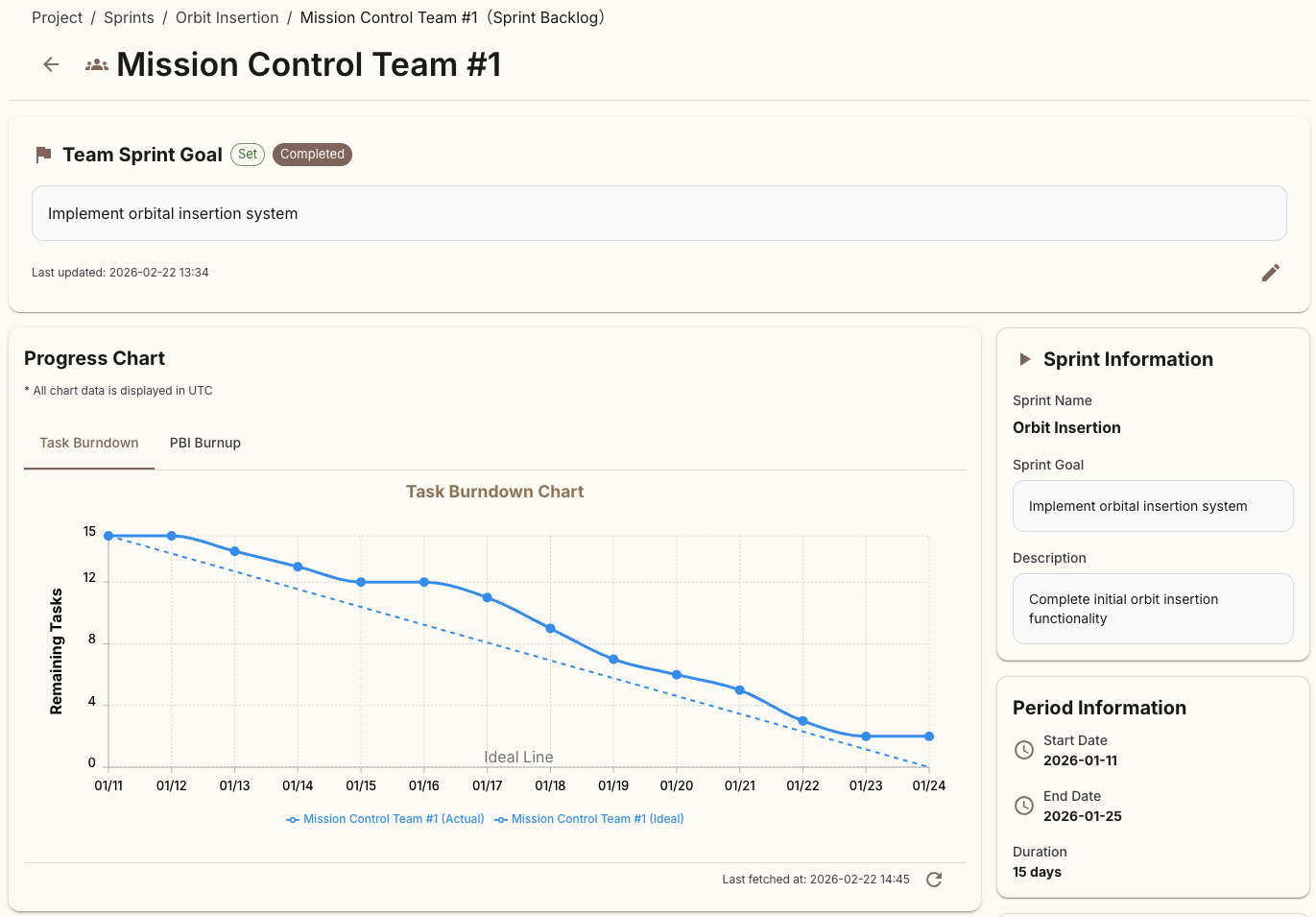
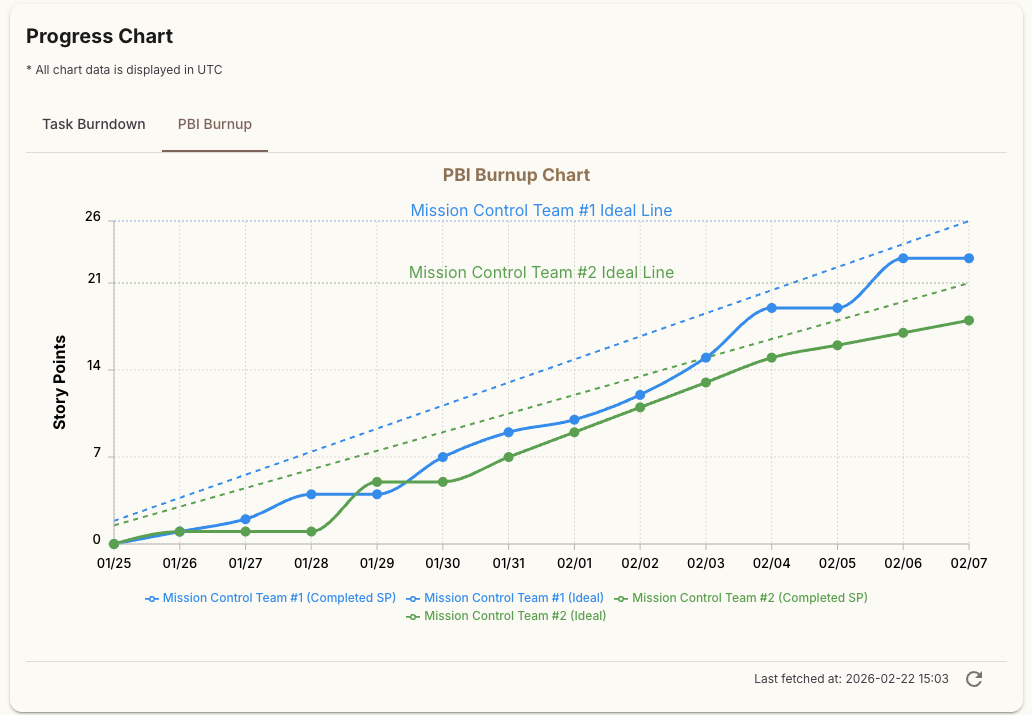
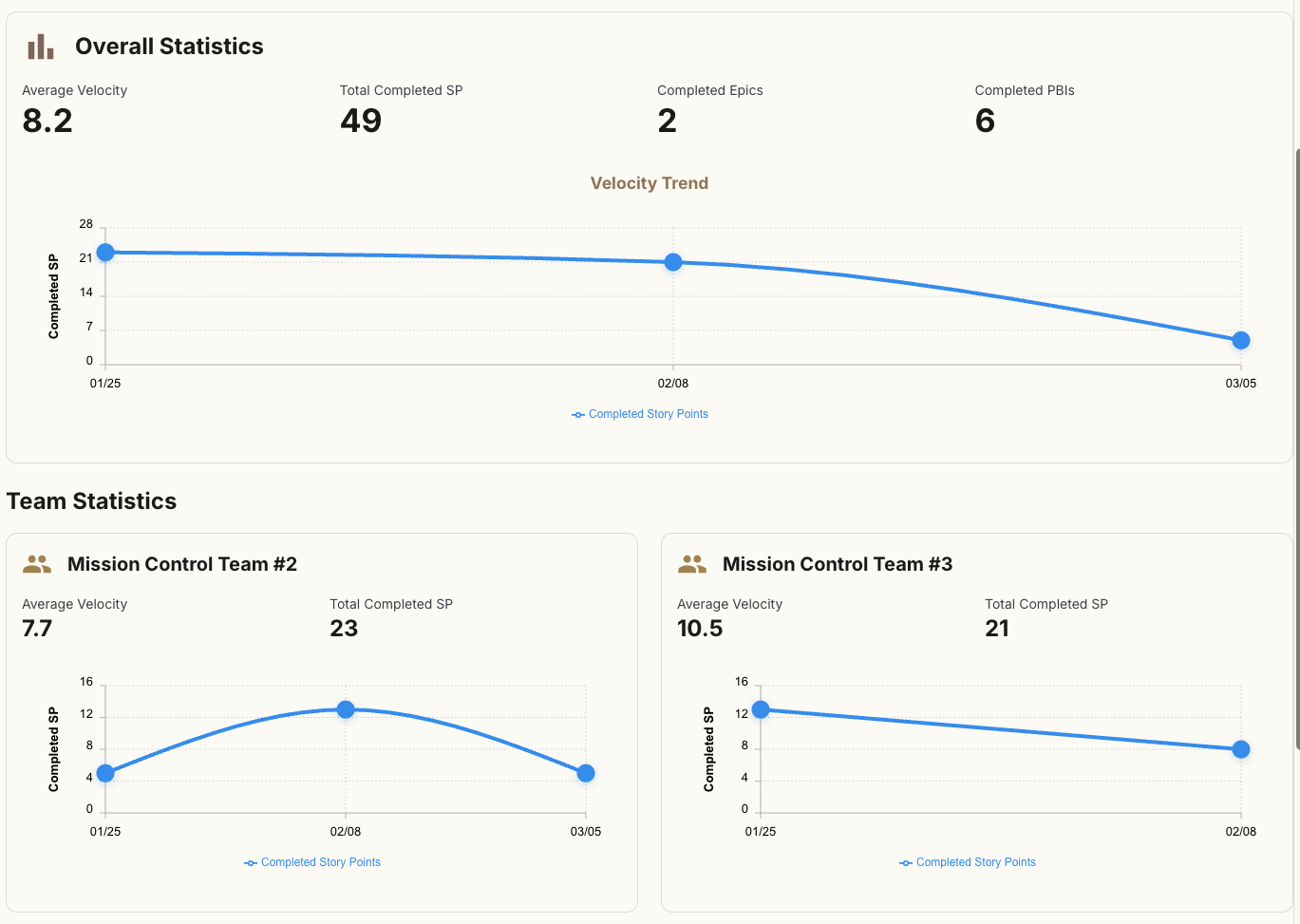
Burnup and Burndown Charts, Velocity Trend make Sprint results clear at a glance. Supports team motivation improvement and continuous improvement.

Track sprint progress in real-time with Burnup and Burndown Charts. Visualize team growth with Velocity Trends, and drive continuous improvement through data-driven retrospectives. Team and individual performance analysis makes every contribution visible.

Real-time grasp of Sprint progress

Discover improvement points with Velocity Trend

Team strength improvement through data-driven retrospectives

Burnup / Velocity Charts
Settings Screen Capture
Feature 05

Customize to
Your Preference

Customize settings per user: themes, languages, animations, timezones, etc. Quick access with keyboard shortcuts.

Light/Dark mode toggle

4-language support (Japanese, English, Tagalog, Vietnamese)

Animation settings (enabled/disabled)

Timezone settings (auto-detection supported)

Feature 06

Multi-Project Support
Safe for Large Organizations

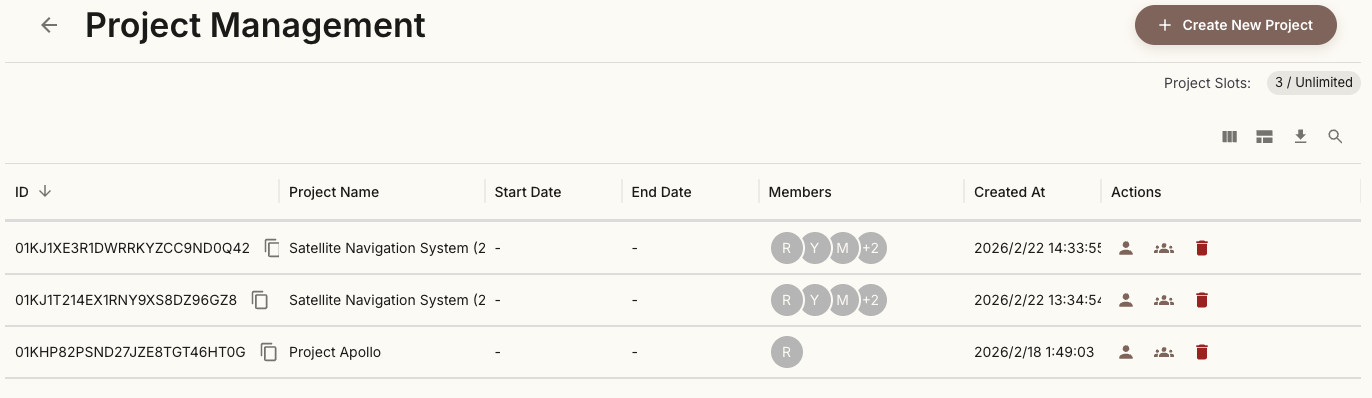
Centrally manage multiple projects with different operations such as development, sales, marketing, and accounting

Create and manage unlimited projects with one account (Micro plan and above). Independent sprint, backlog, and team management per project allows each team to focus on their own tasks. Centralized payment management supports complex workflows in large organizations.

Unlimited project creation (Micro plan and above)

Independent management per project

Project switching for team focus

Centralized payment management

Support for complex workflows in large organizations

Multi-Project Management Screen Capture

Key Features

Powerful features that accelerate Scrum development

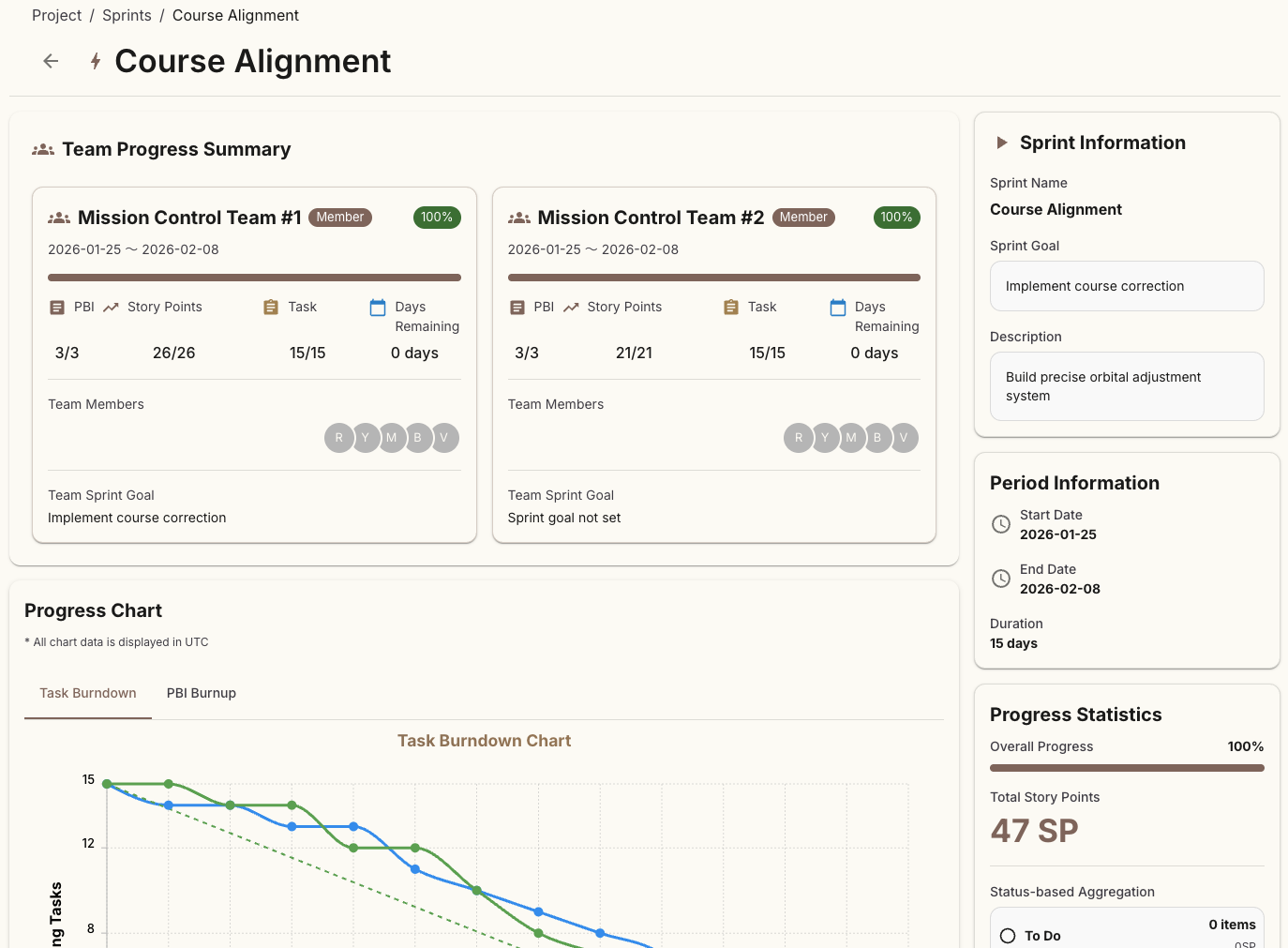
Sprint Management

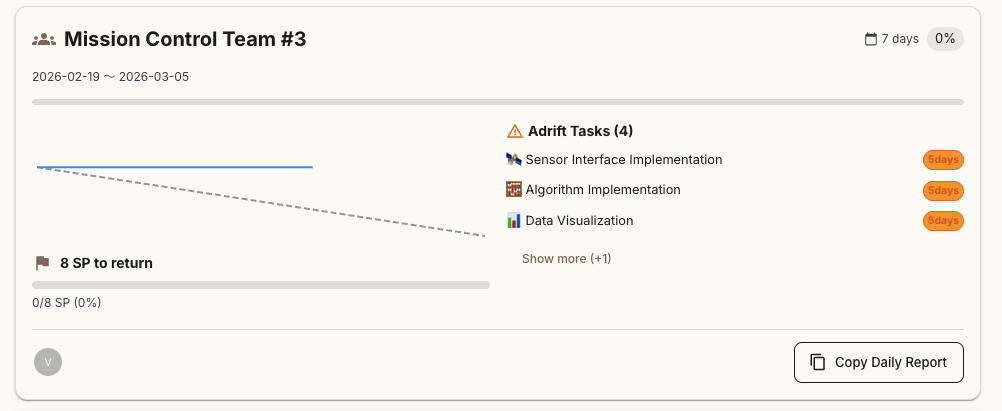
Manage multiple teams in the same sprint. View team progress summaries and burnup/burndown charts on the same page.

Before

Manage separate sprints for each team, can't see the big picture

After

Compare and view progress of multiple teams on one screen

  • Manage multiple teams in the same sprint
  • Display team progress summaries and charts on one screen
  • Batch creation with sprint templates
  • Rocket launch animation when starting sprint
Sprint management screen

Backlog Management

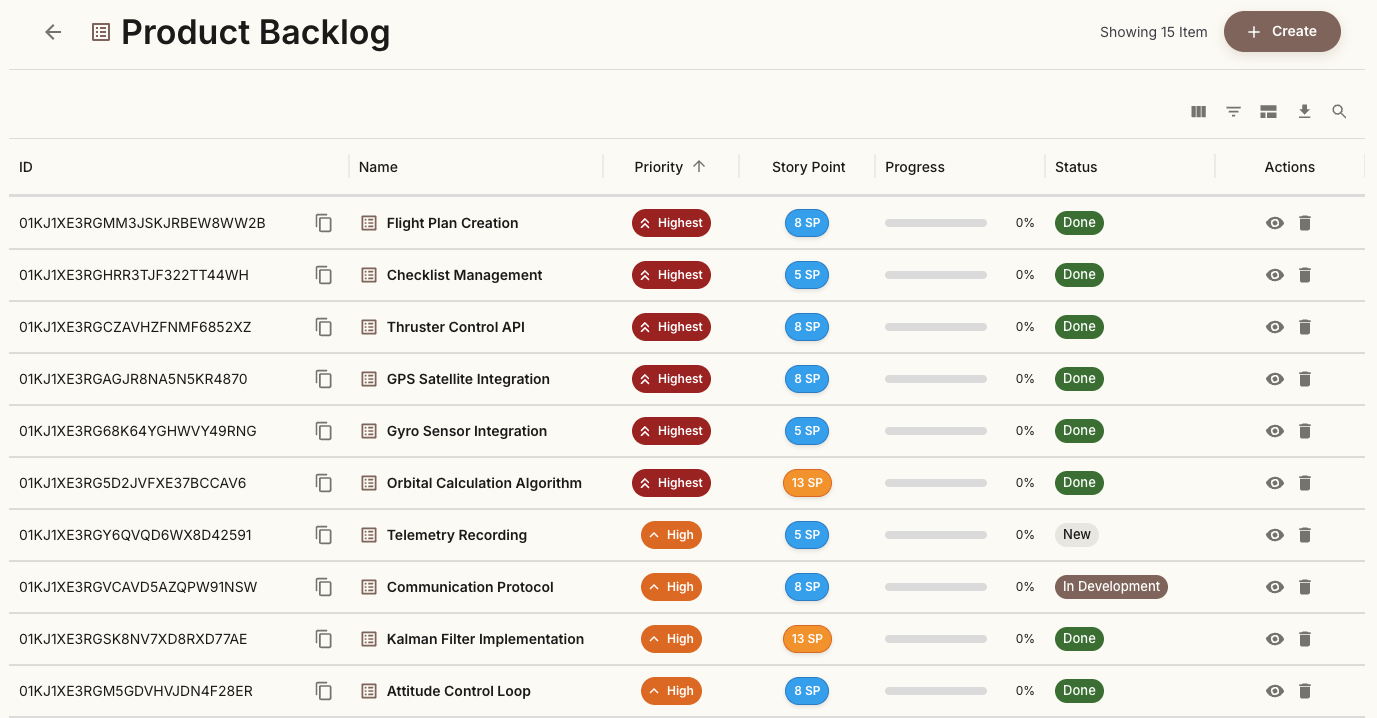
Efficiently manage product backlog with priority management and advanced filtering. Filter states can be shared via URL.

Before

Unclear priorities, takes time to find needed PBIs

After

Clear priority levels, instant filtering

  • 5-level priority system (Highest to Lowest)
  • Advanced filtering (URL shareable)
  • Epic, PBI, Story Point management
Backlog management screen

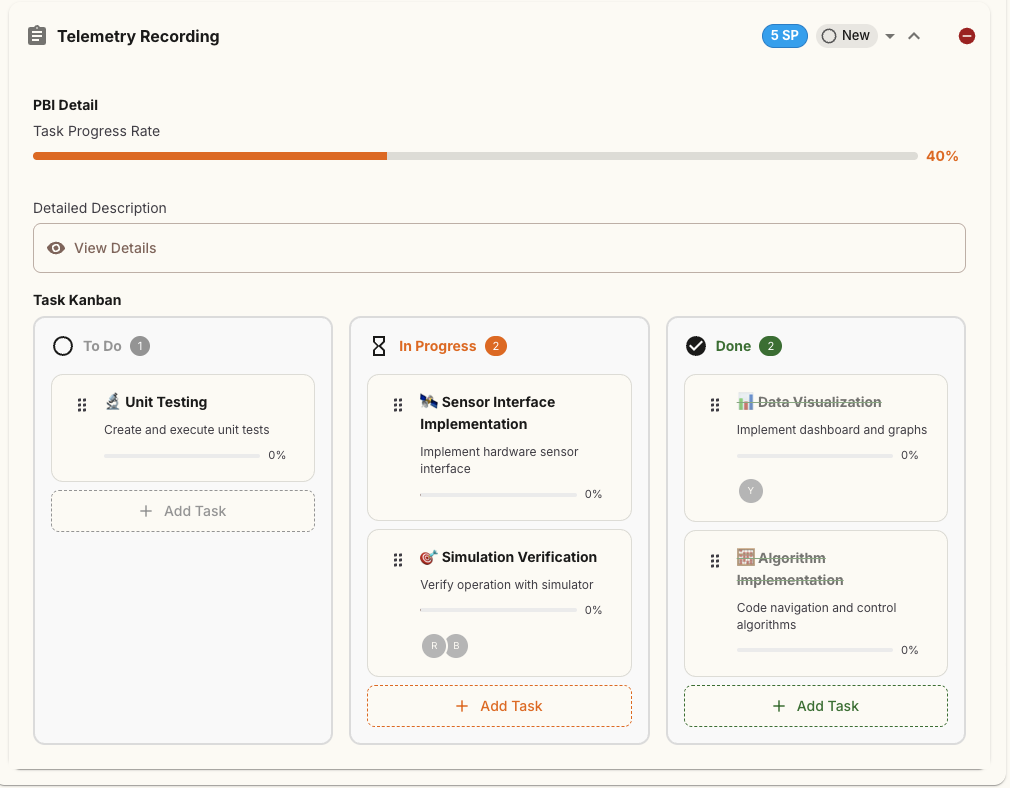
Kanban Board

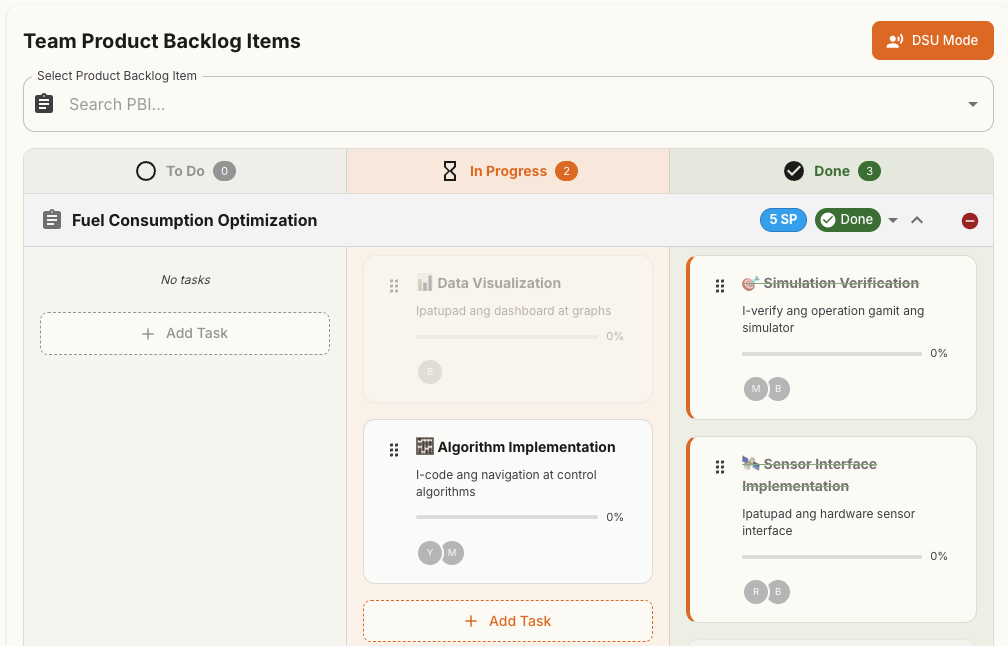
Intuitively move tasks with drag & drop. Sparkle effect on completion creates a sense of achievement.

Before

Status updates are cumbersome and time-consuming

After

Instant changes with drag, visually clear

  • Intuitive drag & drop operation
  • Sparkle effect on completion
  • Customizable column settings
Kanban board screen

Analytics

Visualize team performance with burnup, burndown, and velocity trends. Support data-driven improvements.

Before

Can't see progress, don't know improvement points

After

Clear at a glance with charts, data-driven improvements

  • Burnup and Burndown Charts
  • Velocity Trend Analysis
  • Team and individual performance analysis
  • Task completion ranking (with medals)
Analytics and statistics screen

Multi-Project Management

Safe for large organizations. Centrally manage multiple projects with different operations such as development, sales, marketing, and accounting. Each team can focus on their own tasks, and payments can be centrally managed.

Before

Separate tools for each project, complex management and scattered payments

After

Manage all projects with one account, centralized payments

  • Unlimited project creation (Micro plan and above)
  • Independent sprint, backlog, and team management per project
  • Project switching allows each team to focus on their tasks
  • Centralized payment management (one invoice for all projects)
Multi-project management screen

Role-Based Use Cases

How each team member can utilize Lasimban

Scrum Master

Support smooth team operations

  • Efficient sprint planning
  • Daily Scrum facilitation
  • Visualize and resolve impediments
  • Conduct sprint retrospectives

Product Owner

Maximize product value

  • Priority management
  • Advanced filtering
  • Epic and PBI management
  • Share filter URLs with team

Developer

Efficient task management and progress tracking

  • Select and start tasks
  • Real-time progress updates
  • Collaborate with team members
  • Visualize your own workload

Why is Lasimban Fast and Secure?

Modern technology stack delivers excellent user experience

Technologies Used

Next.js 16

Fast frontend

Go

High-performance backend

GraphQL

Efficient API

WebSocket

Real-time communication

System Architecture

Client Layer

Next.js + Apollo Client

API Layer

Go + GraphQL + WebSocket

Data Layer

MySQL + Cloud Storage

Infrastructure Layer

GCP Cloud Run + Firebase

High Performance

Fast processing with Next.js 16 and Go enables stress-free operation

Secure Authentication

Enterprise-grade security with Firebase Authentication

Scalable

Flexible scaling with GCP Cloud Run as your team grows

Customizable

Customize themes, languages, animations, and more to your preference

Your Scrum Growth Journey

1

Starter

Start comfortably with Starter!

  • Backlog management
  • Sprint planning
  • Burndown chart
2

Micro

Manage multiple teams with Micro plan

  • Unlimited project creation
  • Cross-team overview to see the big picture
  • Up to 2 teams and 6 users
3

Team

Achieve serious Scrum development with Team plan

  • Epic management to organize large projects
  • STATS (Analytics & Insights) to drive improvement
  • Burnup chart
  • Scale up to 8 teams and 30 users with add-ons

🚀 Start with Starter, expand with Micro, master with Team

Step up naturally as your team grows

Pricing Plans

Flexible plans for teams of all sizes

Launch Special Price

Starter

Free

Up to 3 users

1 team / 1 project

  • Multi-language UI (Japanese / English / Vietnamese / Tagalog)
  • Google Authentication
  • Up to 1 project
  • Product Backlog management
  • Sprint management
  • Burndown Chart
  • Stats (latest 1 sprint only)
  • Export functionality
  • Self-service support
Get Started Free
Best Value

Micro

Loading... /month

Up to 6 users

2 teams / Unlimited projects

  • All Starter features
  • Unlimited project creation
  • Cross-team overview
  • Multiple Scrum team creation and management
  • Self-service support
Try Free for 14 Days

Team

🎉 50%OFF Special Price
Loading...
Loading... /month
First 12 months

Up to 10 users

3 teams / Unlimited projects

  • All Micro features
  • Epic management
  • STATS (Analytics & Insights) — Unlimited sprint history
  • Burnup Chart
  • Velocity trend analysis
  • Reporting features
  • Email support (Japanese / English)
  • User expansion: per 10 users (Loading.../month, up to 30 users)
  • Team slot expansion: per team (Loading.../month, up to 8 teams)
Try Free for 14 Days
Team

Everything you need for serious Scrum development

Unlimited sprint history for continuous improvement

Epic management to organize large projects

Burnup charts to visualize progress

Velocity trends to measure team growth

Scale flexibly with add-ons as your team grows

All paid plans include a 14-day free trial

Start now without a credit card

※ Currently available at launch special price. Please take advantage of this opportunity.

※ 50% OFF coupon will be automatically applied at checkout for Team plan (first 12 months)

Frequently Asked Questions

We answer common questions from our customers

If you have any other questions, please feel free to contact us

Contact Us

Contact

For any questions or consultations about Lasimban, please contact us

※ Consultation is free

If you need immediate assistance, you can also contact us via email

info@on-your-side.llc

Start Free

Try all features with a 14-day free trial

Micro and Team plans include a 14-day free trial. After the trial, you will not be charged until you register payment information.

By registering, you agree to the Terms of Service and Privacy Policy.

Maximize your team's potential
with Lasimban

Make Scrum development more intuitive and enjoyable.
Find your team's direction right now.

※ 14-day free trial available. No credit card required.

100%
Scrum-Focused Design
Real-time
Auto Sync
Intuitive
Operation
4 Languages
Supported
Multi-Project
Support